Procedural Sun Surface: UE5 HLSL Compute Shaders & Niagara R&D
- Pavel Zosim
- 2 days ago
- 5 min read
Procedural Sun Surface · UE 5.7 · HLSL · R&D v0.8
This post covers an ongoing R&D project: a no-texture, physically-based sun surface plugin for Unreal Engine 5.7. The goal was not to make "a nice-looking sun" — it was to build a system where every visual parameter is grounded in solar physics and expressible as math, not painted by hand.
The full plugin — SunShaderPlugin — is a UE 5.7 C++ plugin with a custom HLSL library, a compute shader pipeline, and a Niagara solar prominence system. I'm writing this mid-development, so some sections are still evolving. I'll update the post as the project progresses.


Why Not Use Textures?
This technical breakdown explores how to leverage UE5 HLSL Compute Shaders to achieve physical accuracy without texture memory overhead.
The short answer: textures lie.
A tiled noise texture can look like granulation. But it won't behave like it — it won't flow around sunspots, won't respond to a magnetic field map, won't darken physically at the limb. The moment you ask it to do anything beyond "look similar," you hit a wall.
Procedural generation from first principles costs more in ALU, but gives you a system with actual degrees of freedom. Change the temperature range, and the color responds via a blackbody curve. Change the spot seed, and the magnetic topology changes — and so does the chromosphere above it, and the corona loops above that.
That's the architectural bet here: pay the compute cost upfront, gain full physical controllability downstream.
Plugin Architecture: Implementing UE5 HLSL Compute Shaders
The plugin is structured in three layers:
Three spherical meshes:
photosphere (base radius),
chromosphere (×1.005–1.015),
corona (×1.5–3.0).

All three share the same BFieldRT, so spots, spicules, and coronal loops are spatially synchronized at zero extra cost.
The HLSL Layer Stack
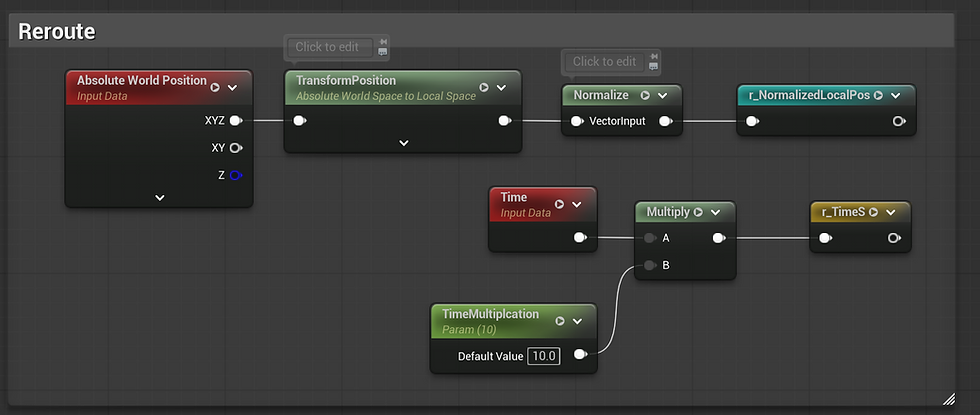
UV Contract
All three materials must use the same UV or structures won't align. The canonical UV derivation in every Custom Node:
Using normalize(AbsoluteWorldPosition) instead is a common mistake: UV gets fixed in world space, and rotating the actor causes the pattern to slide under the mesh.

Layer 1: Photosphere — Granulation
Hot plasma rises through the interior and forms convective cells — granules. Centers are bright and hot; boundaries are dark and cool.
Mathematically, this is inverted Voronoi F1 with domain warping:

HLSL
Layer 2: Sunspots — Magnetic Suppression
Sunspots are regions where concentrated magnetic flux suppresses convection. Temperature drops from ~5800K at the photosphere to ~3800K in the umbra — dark not because they're painted dark, but because they radiate less.
Spot positions are generated on CPU (GenerateSpotPositions) with a deterministic RNG from a seed. Each spot is a FVector4f(U, V, Radius, Polarity). Polarity alternates following Hale's law.
In the compute shader, each pixel accumulates magnetic field contributions from all spots:
The penumbra is a three-layer fibril structure in SunMagnetic.ush: radial fibrils near the umbra boundary, transitioning to horizontal flow farther out. Umbra dots (umbral convection remnants) are gated by a noise threshold inside the umbra mask.





Layer 3: Temperature Pipeline
This is where physics becomes color.
The pipeline in SunTemperature.ush:
Temperature maps to color via a 256×1 BlackbodyLUT sampled at (T - MinT) / (MaxT - MinT). The LUT is baked on CPU at startup using an analytic blackbody curve (BlackbodyToLinearRGB in SunTextureHelper.cpp), normalized to the project's linear working space — no sRGB conversion problems, no gamma drift.
Stefan-Boltzmann weighting is applied before the cinematic grade:
HLSL.
Layer 4: Limb Darkening
The solar disc appears darker at the edges because we're looking through a greater atmospheric depth at oblique angles. This is not an artistic choice — it's a direct consequence of the opacity of the photosphere.
Layer 5: Parallax Occlusion Mapping on a Sphere
POM on a sphere requires latitude-corrected tangent space. A flat TBN doesn't account for the fact that a UV step at the equator covers different physical area than the same step near the poles.
The corrected tangent frame in SunProjection.ush:
Without this correction, POM stretches at poles and compresses at the equator. There's also a singularity at exactly the poles — the max(..., 0.05) clamp limits it to a ~3° cap that's visually invisible at any reasonable camera distance.
Layer 6: Chromosphere
The chromosphere is a thin shell of hot plasma above the photosphere, visible primarily at the limb. Fresnel opacity gates it off the disc center:
Spicules are flow-aligned anisotropic FBM, oriented by BFieldRT.gb flow vectors. World Position Offset extrudes them along the vertex normal.
Layer 7: Corona
The K-corona (the inner white corona visible during eclipses) is not thermal emission. It's Thomson scattering of photosphere light off free electrons. The color is approximately the photosphere's color — white — not blackbody.
Coronal loops are gated by BFieldRT.r (Bz) — they only appear above active regions where the magnetic field is strong. Since photosphere spots, chromosphere plages, and coronal loops all sample the same BFieldRT, spatial alignment is guaranteed without any additional synchronization.
Streamers are multi-layer FBM noise with flow-aligned anisotropy, three parallax depth layers for visual depth without raymarching cost.
Cinematic Grade
Physical blackbody output is perceptually nearly white for a real sun (5778K). A cinematic grade module (SunGrade.ush) sits between the LUT sample and the final compositor, operating entirely in linear space to preserve HDR fidelity.
Presets available:
PresetGolden — warm cinematic sun
PresetTealOrange — split-tone
PresetBlueGiant — cold sci-fi
PresetPhysical — unmodified physics output
Niagara: Solar Prominences
A separate Niagara emitter system handles solar prominences — large magnetic plasma arcs above the chromosphere.


The core challenge was implementing GPU-stable particle pairing: prominences require paired particles (arc start / arc end), and maintaining stable pairs across frames on the GPU is a non-trivial synchronization problem.
The solution uses an adapted Gale-Shapley stable matching algorithm across three Generic Simulation Stages:
FillGrid — populate a NeighborGrid3D with particle positions
FindAndPropose — each particle proposes to its nearest neighbor
ValidateAndPair — validate mutual proposals, write stable pairs
Several compiler-level issues surfaced during this work:
[unroll] on loops with dynamic bounds causes DXC compiler hangs in UE 5.7 — removed, replaced with explicit fixed-count loops.
AttributeReader in Niagara returns previous-frame data, not current-frame. For pairing logic, this requires an explicit one-frame delay in the validation stage.
RWBuffer write collisions on the GPU require careful lane ordering — InterlockedMin / InterlockedMax for atomic pair confirmation.
Arc geometry is shaped via a sine-envelope lift along interpolated surface normals, with a shared RibbonID per pair for the ribbon renderer.
Current Status
Done:
Photosphere: granulation, sunspots (umbra/penumbra/fibrils), temperature pipeline, limb darkening, POM, cinematic grade
Chromosphere: spicules, plages, Fresnel limb opacity, WPO
Corona: K-corona, streamers, coronal loops, Bz synchronization
Compute shader: BField RT, spot generation, RDG dispatch pipeline
C++ plugin: Blueprint API, WorldSubsystem lifecycle, editor subsystem
In progress:
Niagara prominences: pairing algorithm stable, arc ribbon in progress
Houdini simulation reference: a separate post will cover the Houdini side — VEX magnetic field sim used as ground truth for the HLSL approximations
If you have questions about any specific part of the implementation — the compute shader pipeline, the HLSL math, or the Niagara pairing problem — feel free to reach out. The Houdini post will follow.
Like this post? ( ´◔ ω◔`) ノシ
Video Breakdowns: Watch the system in action on YouTube.
Professional Inquiry: Let’s connect on LinkedIn.
Support: If you find this R&D useful, you can support my future deep-dives via Patreon or Buy Me a Coffee.

Comments