CG Shader
CGPROGRAM and ENDCG.
ShaderLab
01 Unity ShaderLab Cheatsheet – Introduction
This Unity ShaderLab cheatsheet provides a structured, production-oriented reference for technical artists working with hand-written shaders in Unity. Whether you’re transitioning from ShaderGraph or diving into hand-written shaders, this guide provides you with an in-depth look at shader code structure, property declaration, and how the GPU processes shader code. We’ll also explore special ShaderLab features such as drawer attributes, tags, and SubShaders, and discuss how these concepts vary across render pipelines (Built-in, URP, HDRP).
Unity ShaderLab Cheatsheet: What is ShaderLab in Unity?
ShaderLab is Unity’s shader definition language used to structure passes, render states and connect CG/HLSL code.
Uses the Cg/HLSL language to write low-level shader programs. A shader file typically contains execution sections enclosed by CGPROGRAM and ENDCG (or modern HLSLPROGRAM blocks for URP/HDRP) that are compiled directly into raw GPU bytecode instructions.
A Unity-specific declarative wrapper that defines properties, SubShaders, passes, and fallback states. It orchestrates how your low-level program interacts with the material Inspector UI and binds to the internal rendering execution pipeline.
IMPORTANT (2026): Unity has officially shifted its core development strategy. URP is now the primary scalable foundation for all future graphics investments, while HDRP enters maintenance mode, and BiRP deprecation officially begins in Unity 6.5.
Timeline & Major Pipeline Iterations
[ 2024 ] Legacy Cleansing & Core Convergence
Focus on stabilizing Scriptable Render Pipelines (SRP) under the hood and phasing out old workflows:
- CGPROGRAM Deprecation: Legacy blocks are fully deprecated in URP/HDRP. Writing
HLSLPROGRAM / ENDHLSLis mandatory to ensure modern shader target compatibility and avoid compilation faults in SRP. - URP 3D Textures (v12+): Native support and sampling mechanics for 3D Textures are stabilized, enabling complex volumetric effects within the Universal pipeline.
- Render Graph Architecture: Initial framework convergence under the hood to align URP and HDRP execution passes.
Key Resources: ShaderLab Code Blocks
[ 2025 ] Unity 6 Production Lifecycle
The release of Unity 6 brings architectural optimization and high-fidelity rendering paths to URP:
- GPU Resident Drawer & Render Graph: Massive draw-call and CPU-overhead reduction via hardware-driven data residency and automatic frame-graph optimization.
- Unity 6.1 (Deferred+ & VRS): Introduction of the
Deferred+rendering path in URP alongside native Variable Rate Shading (VRS) for aggressive modern hardware optimization. - Advanced Feature Reflow: Motion Vector passes, Lights 2D upgrades, and enhanced Alpha Processing bring URP closer to feature parity with old HDRP standards.
Key Resources: Unity 6 What's New URP Changelog 17.0.x
[ 2026 ] The Single Architecture Push
The definitive pivot. Unity consolidates all graphic engineering resources into a single scalable engine:
- URP as the Master Pipeline: Receives high-end extensions previously locked to HDRP: Physical Light Units, Auto-Exposure, Physical Sky managers, Screen Space Reflections (SSR), and real-time Global Illumination.
- HDRP Maintenance Mode: Frozen at current visual feature sets. Engineering is strictly limited to stability, bug fixes, and platform-specific compilation (including Nintendo Switch 2 preview support in v6.5).
- BiRP EOL (End of Life): Deprecation formally begins in Unity 6.5. Legacy projects are supported through Unity 6.7 LTS (until late 2028/2029 for Enterprise), but all Asset Store assets and documentation transition to URP defaults.
Official Sources: Strategy Roadmap Unity Forum Discussion
Production Architecture Matrix (2026+)
Cross-reference checklist for active technical artists and tools engineers starting new codebases:
| Pipeline Target | Lifecycle Status | Shader Block Rule | Hardware Focus |
|---|---|---|---|
| Universal (URP) | ACTIVE / PRIMARY | HLSLPROGRAM (Mandatory) |
Mobile, Web, XR, High-End Console |
| High Definition (HDRP) | MAINTENANCE | HLSLPROGRAM (Mandatory) |
Current High-End PC / Gen 9 / Switch 2 |
| Built-in (BiRP) | DEPRECATED (6.5) | CGPROGRAM (Legacy Only) |
Freeze status / Frozen LTS Lifecycle |
| Capability | Built-in (Legacy) | URP (2026 Core) | HDRP (Maintenance) |
|---|---|---|---|
| Status | DEPRECATED (6.5) Support thru 6.7 LTS (~2028) |
PRIMARY FOCUS All new features & optimizations |
MAINTENANCE ONLY Stability & Switch 2 focus |
| Recommended For | Legacy / Maintenance only | New projects (All genres) | Existing high-end titles |
| Stereo Instancing | Limited | ✓ Full Support (incl. XR) | ✓ Full Support (incl. XR) |
| Ray Traced AO | ✘ None | Limited / via Unified RT | ✓ Full (DX12/Vulkan) |
| Ray Traced Reflections | ✘ None | Limited / via Unified RT | ✓ Full Support |
| Ray Traced GI | ✘ None | Screen-space + New RT GI (2026) | ✓ Full Support |
| Real-time GI | Limited (Old Enlighten) | ✓ New Diffuse GI + SSR (2026) | ✓ Advanced Solutions |
| Screen Space Reflections | Basic | ✓ New in 2026 Strategy | ✓ Advanced Production |
| Physical Light Units | ✘ None | ✓ Integrated in 2026 | ✓ Full Support |
| Shader Model Target | ~3.0 – 5.0 | 4.5 – 6.5+ (HLSLPROGRAM) | 6.5+ (HLSLPROGRAM) |
| Variable Rate Shading | ✘ None | ✓ Supported | ✓ Supported |
| Deferred Rendering | ✓ Native | ✓ Deferred+ (Unity 6+) | ✓ Advanced Path |
| Forward+ Rendering | Limited | ✓ Strong / Scalable | Hybrid Architecture |
| 3D / Volume Textures | Limited | ✓ Stable & Improved (v12+) | ✓ Full Support |
| General Ray Tracing | ✘ None | Unified Backend (HW + SW) | ✓ Full Feature Set |
| Platform Reach | Broadest (Legacy) | Best (Mobile → High-End, XR) | High-End PC / Console Only |
| Build Time / Perf | Good for small legacy | Excellent + Engine Optimizations | Heavier, High Hardware Cost |
| Shader Graph Priority | Low / Static | High (New features first) | High Architecture |
| Custom Shaders Code | CGPROGRAM (Legacy) |
HLSLPROGRAM (Mandatory) |
HLSLPROGRAM (Mandatory) |
02 How ShaderLab Works with CG and HLSL in Unity
The GPU reads shader code sequentially — from top to bottom. The typical structure of a execution pipeline block inside CGPROGRAM / HLSLPROGRAM environments follows this strict sequence:
- Function Declaration: Functions must be declared in code text before they are invoked. Forward-evaluation only.
- Shader Stages: The Vertex stage always completes lifecycle tasks before the Fragment stage processes fragments.
- Massive Parallelism: The hardware processes vertices and pixels simultaneously across thousands of atomic GPU cores.
- No Fixed Sorting: There is zero hardware guarantee regarding the chronological processing order of individual fragments.
Shader Execution Data Flow
Architectural data flow graph from local application memory down to the hardware frame display buffer:
Code Example: Basic Color Shader
Below is a production-ready blueprint of a basic unlit color shader. It demonstrates how properties declared in the ShaderLab interface are bound to uniform variables within the programmable HLSL stages to output a solid color fragment.
Shader "Custom/Pipeline/BasicColor"
    {
        Properties
        {
            _Color ("Main Color", Color) = (1.0, 1.0, 1.0, 1.0)
        }

        SubShader
        {
            Tags
            {
                "RenderType" = "Opaque"
                "RenderPipeline" = "UniversalPipeline"
            }

            Pass
            {
                Name "ForwardLit"

                HLSLPROGRAM
                #pragma vertex vert
                #pragma fragment frag

                #include "Packages/com.unity.render-pipelines.universal/ShaderLibrary/Core.hlsl"

                // Data structure passed from the 3D application to the Vertex Shader
                struct Attributes
                {
                    float4 positionOS   : POSITION;
                };

                // Data structure passed from the Vertex Shader to the Fragment Shader
                struct Varyings
                {
                    float4 positionCS   : SV_POSITION;
                };

                // Uniform buffer mapping the ShaderLab Property block
                CBUFFER_START(UnityPerMaterial)
                    half4 _Color;
                CBUFFER_END

                // Vertex Shader Stage: Geometry Transformation
                Varyings vert(Attributes input)
                {
                    Varyings output;
                    // Transforming object space position to homogenous clip space
                    output.positionCS = TransformObjectToHClip(input.positionOS.xyz);
                    return output;
                }

                // Fragment Shader Stage: Per-Pixel Rasterization Color
                half4 frag(Varyings input) : SV_Target
                {
                    // Returns the uniform color value driven by the material inspector
                    return _Color;
                }
                ENDHLSL
            }
        }
    }
Explanation of Architectural Stages
- Properties Block:
Declares_Colorwith the display name “Main Color” and a default solid white value. Remember: no semicolons at the end of properties lines in ShaderLab syntax! - Global Variable Usage (CBUFFER):
To ensure modern SRP batcher compatibility, thehalf4 _Colorvariable is wrapped inside aUnityPerMaterialconstant buffer. This allows the GPU to cache material data efficiently across draw calls. - Shader Stages:
The vertex shader (vert) runs first to transform local polygon vertices into raw clip space data. The fixed-function hardware then rasterizes the primitives, handing off pixel fragments to the fragment shader (frag) which evaluates the final_Colortoken onto the target frame buffer.
03 Shader Identity & Property Binding
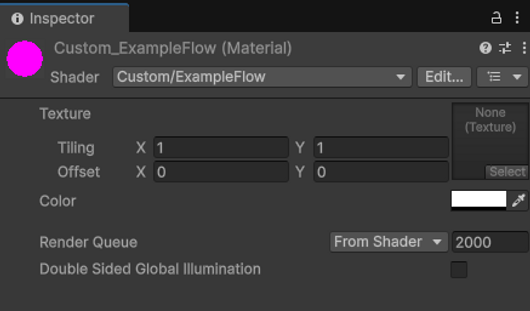
Before you dive into writing low-level execution logic, it is essential to declare your shader’s namespace and define its data interface. This section serves as the primary configuration entry point for both the compiler and the Unity Editor UI, handling two critical architecture tasks:
- Establish the Shader’s Identity:
The root shader string determines how the file is parsed by Unity’s internal database and categorizes it into hierarchical menus (e.g.,"Custom/Pipeline/ExampleFlow"). This structural organization is vital for pipeline maintenance, ensuring that production artists can instantly locate the material target. - Expose Inspector-Editable Properties:
TheProperties { }block functions as a declarative bridge. Variables initialized here (Textures, Vectors, Colors, Floats) are exposed directly to the Material Inspector UI. They drive the rendering behavior at runtime by updating uniform buffers, allowing real-time look-development tweaks without triggering shader recompilation.
Initialization Rule: Define the immutable shader namespace path and initialize the inspector-visible memory properties. Semicolons are strictly prohibited at the end of ShaderLab block declarations.
First Step: Define shader name and inspector-visible properties. Syntax rule declaration:
Shader "Custom/Pipeline/ExampleFlow"
                    {
                        Properties
                        {
                            // Syntax: _PropertyName ("Inspector Name", Type) = DefaultValue
                            _MainTex ("Base Texture (RGBA)", 2D) = "white" {}
                            _Color ("Tint Color", Color) = (1, 1, 1, 1)
                            _Value ("Intensity Float", Float) = 1.0
                        }

                        // Low-level graphics pipeline execution blocks follow here...
                    }
The root string identifier of any ShaderLab file determines its unique hierarchical token and location within the Unity material shader dropdown selection menus. This organizational path controls how the engine's internal asset database parses, references, and presents the compiled binary compile target to technical users.
- Default Compiler Path: Standard global registration without custom grouping (e.g., automatically placing the compiled state under hidden or system-defined directories).
Shader "CustomPath/ShaderName_simpleColor"Shader "CustomPath/ShaderName_simpleColor" PropertyName("Display Name", DataType) = DefaultValue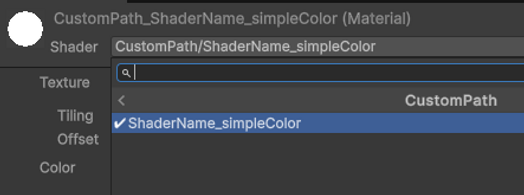
"CustomPath/ShaderName_simpleColor", dynamically instantiating the CustomPath folder hierarchy within the Material Selector viewport dropdown.
04 Properties Syntax & Data Types
Within the shader declaration, the Properties block allows you to expose parameters to the user. The basic syntax for each property is:
PropertyName("Display Name", DataType) = DefaultValuePropertyName:
This is the internal identifier (e.g., _MainTex), which the shader code uses to reference the property.Display Name:
The human-readable label that appears in the Inspector. This makes it easier for users to understand what the property does.Data Type:
Specifies the kind of data the property holds. (read sec. 3.2.x)Default Value:
This is the initial value assigned to the property when the shader is first used. For textures, this might be a reference like "white" or "defaultTexture".
Numeric Data Types
These properties control scalar values such as factors, intensity, or other numerical parameters.
Float:
A single-precision floating-point value. Useful for parameters that need fractional precision.Int:
An integer value for discrete parameters. When the value should be a whole number.Range:
A float that’s constrained between a minimum and maximum value and is displayed as a slider in the Inspector. Ideal for values where you want to restrict input to a specific range.
_Factor ("Factor", Float) = 0.1                // Float property
                        _Name ("Name", Int) = 1                        // Integer property
                        _Specular ("Specularity", Range(0,1)) = 0.0   // Range property
_VPos ("Position", Vector) = (0, 0, 0, 1)Color:
Represents a color using four components (R, G, B, A). Commonly used for tinting, diffuse colors, etc.[HDR]:
For HDR effects in HDRP, (Attribute Drawer sec. 3.3.4) - When using high-intensity colors (e.g., for emission), the [HDR] attribute is required to ensure proper tonemapping.
Texture Types
Textures provide image-based data for surfaces. Unity includes several texture types with built-in defaults (e.g., "white", "black", "gray", "bump").
2D:
Represents a 2D image, typically used for diffuse maps, normal maps, etc.Cube:
A cubemap used for environmental mapping or reflections.3D:
A volumetric texture, used less frequently. May have additional constraints; consult HDRP documentation for detailed behavior.
05 ShaderLab Attribute Drawers
Attribute drawers in ShaderLab allow you to customize how properties appear in the Unity Inspector and how they affect shader variants without needing to swap materials. They serve two main purposes:
- Inspector Organization: They help arrange properties visually for better usability and clarity.
- Shader Functionality & Variants: They can automatically generate shader keywords for conditional compilation, ensuring that toggled effects are efficiently managed.
Organization Drawers
Organization drawers control the visibility and layout of properties in the Inspector.
[HideInInspector]:
Hides the property value from the material Inspector. Used for internal or technical parameters that shouldn’t be modified by artists.[NoScaleOffset]:
Prevents the display of tiling and offset fields for texture properties. Use this when the texture’s transform is fixed or controlled elsewhere.[Header] & [Space]:
Organize properties with headers and spacing.
// Example implementation of Organization Drawers
                            [NoScaleOffset] _MainTex ("Main Texture", 2D) = "white" {}

                            [Header(Specular Properties)]
                            _Specularity ("Specularity", Range(0.01, 1)) = 0.08
                            _Brightness ("Brightness", Range(0.01, 1)) = 0.08
                            _SpecularColor ("Specular Color", Color) = (1, 1, 1, 1)

                            [Space(20)]
                            [Header(Texture Properties)]
_MainTex ("Texture", 2D) = "white" {}These organization attributes work consistently across Built-in, URP, and HDRP. However, clarity in grouping and hiding properties is especially valuable in complex HDRP shaders where many technical settings are involved.
Range & Numeric Drawers
These drawers customize how numeric inputs are displayed, offering more control than a standard slider.
[PowerSlider]:
Provides a slider with a non-linear (exponential) scaling factor.[IntRange]:
Generates a slider for integer values.
[PowerSlider(3.0)] _Brightness ("Brightness", Range(0.01, 1)) = 0.08
                                [IntRange] _Samples ("Samples", Range(0, 255)) = 100
Shader Variant Drawers
These drawers enable the creation of shader variants and toggle features without needing multiple materials. Since ShaderLab doesn’t support booleans directly, these attributes simulate boolean toggles using float properties.
[Toggle]:
Simulates a boolean toggle (0 = Off, 1 = On) and auto-generates a corresponding shader keyword (e.g., ENABLEFANCY_ON).
[Toggle(ENABLE_FANCY)] _Fancy ("Fancy?", Float) = 0

                            // Then in your shader code:
                            #pragma shader_feature _ENABLE_FANCY_ON

                            #if _ENABLE_FANCY_ON
                                // Fancy effect enabled
                            #else
                                // Default behavior
#endif[KeywordEnum]:
Creates a dropdown with multiple options that generate keywords, such as for blend modes or other multi-option settings.
[KeywordEnum(None, Add, Multiply)] _Overlay ("Overlay Mode", Float) = 0

                            // Then in your shader code:
#pragma multi_compile _OVERLAY_NONE _OVERLAY_ADD _OVERLAY_MULTIPLY[Enum]:
Generates dropdown menus for selecting from a list of options like blend modes, depth testing functions, or culling modes.
[Enum(UnityEngine.Rendering.BlendMode)] _Blend ("Blend Mode", Float) = 1
                            [Enum(UnityEngine.Rendering.CompareFunction)] _ZTest ("ZTest", Float) = 0
[Enum(UnityEngine.Rendering.CullMode)] _CullMode ("Cull Mode", Int) = 0Pipeline Note: Shader variant drawers work similarly across render pipelines. However, when working with HDRP, you might have additional keywords or variant controls to handle advanced features (like volumetric lighting) that require conditional compilation.
Texture & Color Specific Drawers
These drawers tailor the display and handling of texture and color properties to match their intended use.
[Normal]:
Indicates that the texture is a normal map, helping the editor set up the correct import settings.[HDR]:
Marks a color property as high-dynamic range, which is crucial for proper tonemapping in HDRP.
Pipeline Note: While Built-in and URP handle standard color values, HDRP requires the [HDR] attribute to ensure correct tonemapping.
[Gamma]:
Denotes that a float or vector property is defined in sRGB (gamma) space. Unity uses this to convert values appropriately, especially in projects set to a linear color space.[PerRendererData]:
Signals that the property may be overridden per renderer, for example using a MaterialPropertyBlock, allowing for instance-specific data.
Syntax specification mapping:
                        [Normal] _BumpMap ("Normal Map", 2D) = "bump" {}
                        [HDR] _Emission ("Emission Color", Color) = (1, 1, 1, 1)
                        [Gamma] _Tint ("Tint Color", Color) = (1, 1, 1, 1)
                        [PerRendererData] _DetailTex ("Detail Texture", 2D) = "gray" {}