Editorial note: the original post was written as marketing copy. This version adds the technical detail that was missing: why the File Merge SOP bottlenecks at scale, how Python's os.walk traversal maps to Houdini geometry groups, what local transform correction means in practice, and a breakdown of the performance delta. Sections 02, 03, 04 and all code examples are additions beyond the original text.
01 The Problem — File Merge SOP at Scale
Houdini's built-in File Merge SOP handles geometry import through a manually configured file list or a single glob pattern. This works well for a handful of files in a flat directory. It breaks down in three specific ways as asset sets grow:
| SCENARIO | FILE MERGE SOP BEHAVIOUR | COST |
|---|---|---|
| 50+ files across nested folders | Requires manual path entry or one glob per folder depth. No recursive traversal. | Engineer manually builds file list — error-prone, not repeatable |
| Mixed format directory (OBJ + FBX + USD) | Single glob pattern matches all extensions — imports unwanted files. | Downstream nodes receive unexpected geometry types |
| Folder structure encodes asset grouping | Folder hierarchy is discarded — all geometry merged into one flat stream. | Group information lost — manual re-grouping required downstream |
| Asset set changes between shots | File list must be manually updated each time directory contents change. | Re-entry work each iteration — pipeline not reproducible |
The core issue is that File Merge SOP treats the filesystem as a flat list. Real production asset sets are hierarchical by design — folder structure encodes LOD level, asset category, variant, or department. Discarding that structure at import forces manual reconstruction downstream.
02 How the Tool Works — Directory Traversal
The tool uses Python's os.walk to recursively traverse a root directory. For each subdirectory, it collects geometry files matching a configurable format filter, imports them via Houdini's Python SOP API, and writes primitive group attributes preserving the folder name as the group identifier.
Python Implementation Pattern
import os
import hou

node    = hou.pwd()
geo     = node.geometry()

root_dir    = node.parm('root_directory').eval()
formats     = node.parm('file_formats').eval().split()   # e.g. ['.obj', '.fbx']
merge_geo   = hou.Geometry()

for dirpath, dirnames, filenames in os.walk(root_dir):
    # Derive group name from folder path relative to root
    rel_path   = os.path.relpath(dirpath, root_dir)
    # Sanitize: replace path separators and spaces with underscores
    group_name = rel_path.replace(os.sep, '_').replace(' ', '_').replace('.', '')
    if group_name == '':
        group_name = 'root'

    for fname in sorted(filenames):
        ext = os.path.splitext(fname)[1].lower()
        if ext not in formats:
            continue   # format filter — skip unwanted extensions

        fpath = os.path.join(dirpath, fname)

        # Import geometry file into temporary geometry object
        file_geo = hou.Geometry()
        file_geo.loadFromFile(fpath)

        # Tag all imported primitives with folder-derived group attribute
        grp = file_geo.findPrimGroup(group_name)
        if grp is None:
            grp = file_geo.createPrimGroup(group_name)
        for prim in file_geo.prims():
            grp.add(prim)

        # Also write string attribute for downstream material / LOD logic
        s_attr = file_geo.findPrimAttrib('folder_group')
        if s_attr is None:
            s_attr = file_geo.addAttrib(
                hou.attribType.Prim, 'folder_group', '')
        for prim in file_geo.prims():
            prim.setAttribValue('folder_group', group_name)

        merge_geo.merge(file_geo)

geo.merge(merge_geo)
Folder → Group Mapping
The folder hierarchy maps directly to Houdini primitive groups. A directory structure like the one below produces distinct, addressable groups in the merged geometry:
assets/
  vehicles/
    car_body.obj
    car_wheels.obj
  environment/
    road.obj
barriers.objPrimitive groups:
vehicles → car_body + car_wheels prims
environment → road + barriers prims
String attribute 'folder_group':
"vehicles" → per-prim on car geometry
"environment" → per-prim on env geometryBoth a primitive group and a string attribute are written for each folder. The group enables fast SOP-level selection and partition operations. The string attribute enables downstream VEX logic — LOD switching, material assignment, instancing rules — that needs to query the folder origin per-primitive without group overhead.
| PARAMETER | TYPE | FUNCTION |
|---|---|---|
| Root Directory | String / path | Top-level folder to scan — all subdirectories traversed recursively |
| File Formats | Space-separated string | Whitelist of extensions to import: .obj .fbx .usd .abc |
| Group Naming | Enum | Folder name only / relative path / full path as group identifier |
| Transform Correction | Bool + vector | Apply local rotation/scale fix per imported file before merge |
| Sort Order | Enum | Alphabetical / modification time — controls merge order for determinism |
03 Local Transform Correction
A common issue with multi-source geometry imports is axis orientation mismatch. OBJ files from different DCCs use different up-axis conventions — Maya exports Y-up, Blender exports Z-up by default, 3ds Max uses Z-up. FBX carries transform metadata but it is frequently ignored or misread by Houdini's importer depending on version and export settings.
The result is that geometries arrive with correct topology but wrong local rotation or scale. In a flat import this must be corrected after the merge — which is ambiguous when multiple sources with different conventions are merged into one geometry stream.
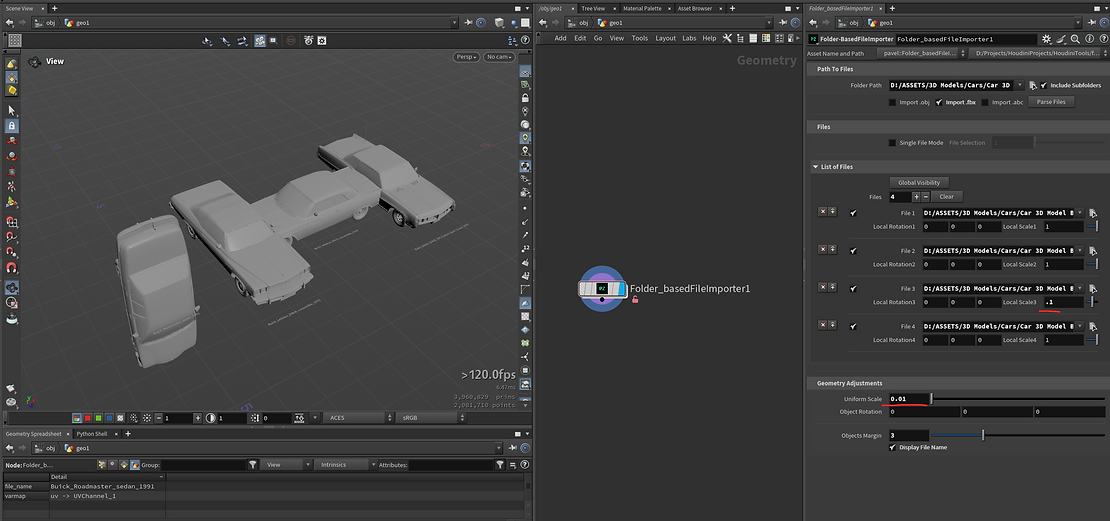
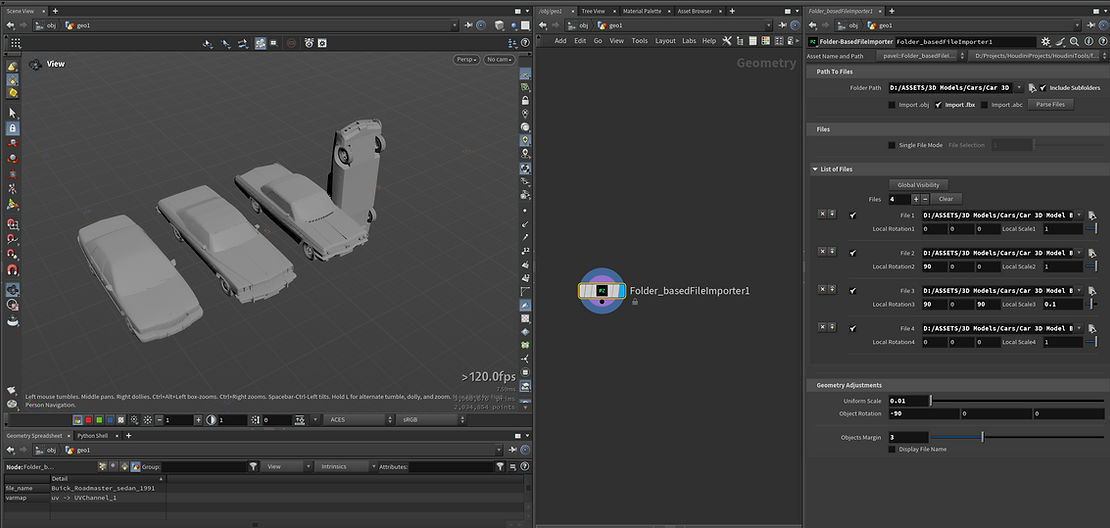
The tool applies transform correction per imported file, before merging into the combined geometry stream. This means different files in the same import batch can receive different corrections — a Y-up OBJ and a Z-up FBX in the same directory both arrive correctly oriented without post-merge ambiguity.
| SOURCE DCC | DEFAULT EXPORT | CORRECTION NEEDED FOR HOUDINI (Y-UP) |
|---|---|---|
| Maya | Y-up | None — matches Houdini default |
| Blender | Z-up (default) | Rotate −90° around X |
| 3ds Max | Z-up | Rotate −90° around X |
| Unreal Engine FBX | Z-up, scale ×100 | Rotate −90° around X + scale ×0.01 |
| Unity FBX | Y-up, Left-handed | Negate X axis |
04 Performance Comparison
In a representative test — 3 OBJ files totalling 1,387,781 polygons — the tool was benchmarked against the equivalent manual File Merge SOP setup:
| METHOD | EXECUTION TIME | MANUAL STEPS REQUIRED |
|---|---|---|
| Folder-Based File Importer | 2.396 s | Set root directory + format filter. Zero per-file configuration. |
| File Merge SOP (manual) | 2.625 s | Manually select each file, configure merge order, set up grouping nodes separately. |

The 9% execution time difference is not the primary benefit — the actual gain is zero manual file selection and automatic group preservation. As file counts scale from 3 to 300, the manual approach grows linearly in setup time while the tool's setup cost remains constant: one root directory path.
- Manual file selection — one entry per file
- Single glob pattern — no per-folder filtering
- No recursive subfolder traversal
- No format whitelist — matches all extensions
- No group output — flat merged geometry
- Must be reconfigured when directory changes
- Automatic recursive directory scan
- Format whitelist — import only required extensions
- Folder hierarchy → primitive groups + string attributes
- Per-file local transform correction before merge
- Deterministic — same directory always produces same output
- Recooks automatically when directory contents change
05 Pipeline Position & Use Cases
The tool sits at the ingestion stage of a Houdini pipeline — immediately after receiving external assets, before any procedural processing. Its output is a single merged geometry stream with group and attribute metadata intact, ready for any downstream SOP network.
| USE CASE | BENEFIT |
|---|---|
| Game asset batch import (characters, props, environments) | Folder-per-category becomes Houdini group — LOD and variant selection without additional grouping nodes |
| Scan / photogrammetry multi-piece imports | Format filter excludes texture files and metadata — only mesh geometry imported |
| Client deliverable integration | Deterministic output regardless of who prepared the directory — same structure always produces same Houdini groups |
| Iterative asset updates | Replacing files in the directory automatically recooks the import — no manual node reconfiguration |
| Multi-department asset assembly | Department folder name becomes group attribute — downstream partition or split-by-attribute works immediately |
- [01]
-
[02]
DOCS — Python HOM: hou.Geometry.loadFromFile. Houdini Python API.
sidefx.com — hou.Geometry.loadFromFile - [03]
- [04]