- 01What Problem It Solves
- 02Face Assignment & Live Preview
- —Automatic Face Detection
- —3D Cube & Inside 360° Preview
- 03Output Formats & Export Pipeline
- —PNG / TGA / BMP Layouts
- —DDS via texassemble
- 04Architecture & Project Structure
- 05Installation — Windows & Linux
- 06Workflow
- 07Current Scope & Limitations
01 What Problem It Solves
A cubemap is six square images bolted together in a fixed order — but "fixed" only helps if every tool along the pipeline agrees on what that order is. DirectX expects +X, −X, +Y, −Y, +Z, −Z. Source frames rendered from a Houdini camera rig, exported from a panorama stitcher, or handed off by another artist rarely arrive labelled that way, and reassembling them by hand in a generic image editor means eyeballing rotations and hoping the skybox doesn't show a seam.
The Cubemap Assembly Tool is a free, open-source desktop utility that takes over exactly that hand-off: six explicit face slots in the correct DirectX order, automatic face guessing from common filenames, per-face rotate/flip correction, and a live preview — both an orbiting 3D cube and a from-the-inside 360° view — before anything is exported to a cross, strip, or DDS texture.
The tool is built around one constraint that engines impose and general image editors ignore: face order and orientation are fixed by the target format, not by however the source frames happened to be authored. Every correction — rotation, flip, face assignment — happens before export, with the result previewed first, not guessed at afterward.
| FEATURE | DETAIL |
|---|---|
| Face input | Six explicit DirectX face slots in required order. Supports PNG, JPG, JPEG, BMP, TGA, TIFF, WEBP. |
| Automatic face guessing | Filenames such as posx, right, top, front are matched to the correct face automatically. |
| Per-face correction | Rotate in 90° steps, flip horizontally, flip vertically, replace, or remove — independently per face. |
| 3D cube preview | Drag to orbit, wheel to zoom — offline, no export required to check the result. |
| Inside 360° preview | Look outward from the centre of the cube; drag to look, wheel to change field of view. |
| 2D layout preview | Live horizontal cross, vertical cross, horizontal strip, and vertical strip canvases. |
| Cross-platform layout export | PNG / TGA / BMP, rendered in pure Python via Pillow — no external dependency required. |
| DDS cubemap export | Through Microsoft's texassemble: face size, filter, DXGI format, sRGB, DX10 header, and overwrite options. |
| Safe installers | Project-local .venv installers and launchers for Windows and Linux. |
02 Face Assignment & Live Preview
Automatic Face Detection
Dropping in six arbitrarily named files still needs to end up on the correct face. The tool normalizes each filename stem and checks it against a small alias table before falling back to manual assignment:
| FACE | DIRECTX SLOT | RECOGNISED ALIASES |
|---|---|---|
| px | +X / RIGHT | posx, xpos, positive_x, right, east, +x |
| nx | −X / LEFT | negx, xneg, negative_x, left, west, -x |
| py | +Y / UP | posy, ypos, positive_y, top, up, +y |
| ny | −Y / DOWN | negy, yneg, negative_y, bottom, down, -y |
| pz | +Z / FRONT | posz, zpos, positive_z, front, forward, +z |
| nz | −Z / BACK | negz, zneg, negative_z, back, rear, -z |
Pressing AUTO LOAD 6 FILES selects a batch, matches whatever filenames it recognises to their face, and drops any leftover unrecognised files into the remaining empty slots in DirectX order. Nothing is silently discarded — files that don't match an alias still get placed, just without a guessed face, so the artist confirms the rest manually.
Mismatched or non-square source faces are not rejected — they're resized. Validation flags faces that aren't square, or that don't share one common resolution, but export still proceeds: every face is independently resized to the target output size. The warning exists so the artist knows a resize is about to happen, not to block it.
3D Cube & Inside 360° Preview
Six CSS-transformed faces on a real cube, rendered from the same preview thumbnails used in the face grid. Drag to orbit, scroll to zoom.
Use for: checking that faces meet correctly at the seams and that rotation/flip corrections line up before spending an export cycle.
A small ray-per-pixel renderer projects a look direction (yaw, pitch, adjustable field of view) outward, samples the correct cached face texture per pixel, and draws the result to a canvas — approximating what the cubemap looks like from inside, the way it will be sampled at runtime.
Use for: validating a skybox or reflection cubemap the way a camera or reflection probe will actually see it, without opening a game engine.
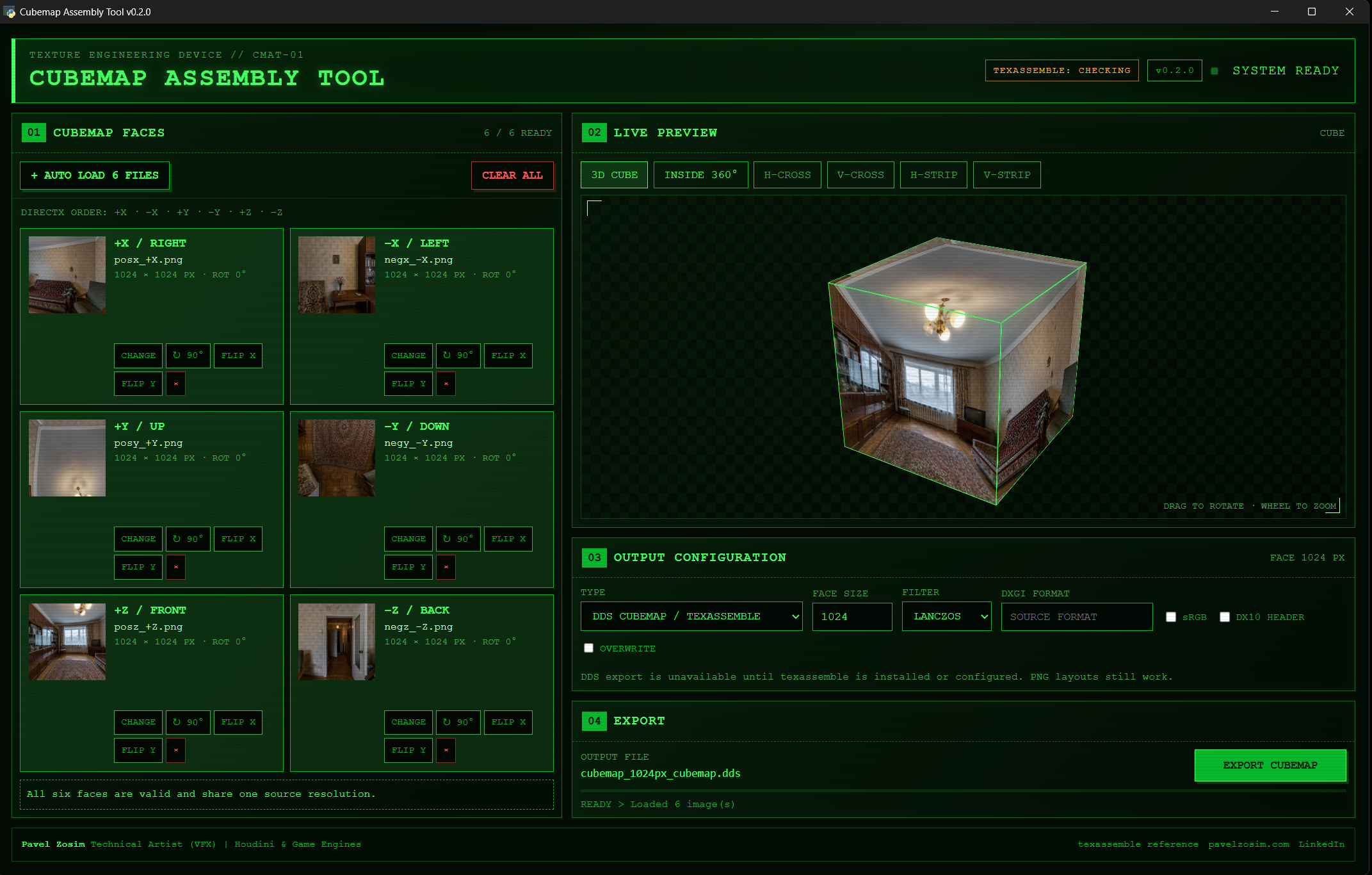
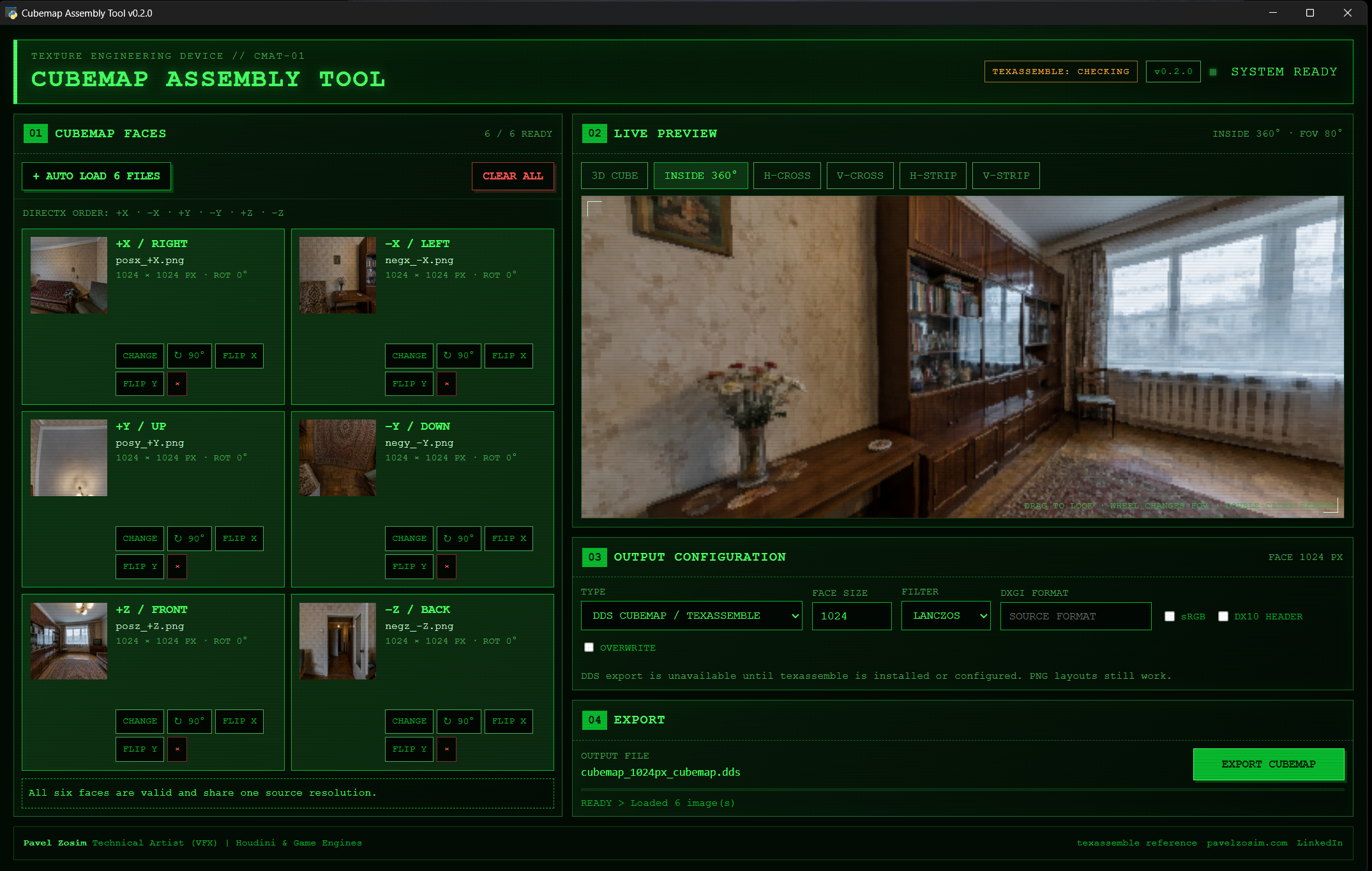
Both previews and the four 2D layout previews (H-Cross, V-Cross, H-Strip, V-Strip) run entirely offline in the desktop window — nothing is written to disk until EXPORT CUBEMAP is pressed.
03 Output Formats & Export Pipeline
Export always runs on a background thread with progress reported back to the UI, so the window stays responsive on large face sizes. The output filename encodes the size and layout so it's identifiable without reopening the tool:
// Naming format:
cubemap_<face-size>px_<type>.<ext>

// Examples:
cubemap_1024px_hcross.png
cubemap_2048px_vcross_fnz.png
cubemap_512px_hstrip.tga
cubemap_2048px_cubemap.dds
PNG / TGA / BMP Layouts
Rendered in pure Python with Pillow — no external binary, works identically on Windows and Linux. Five layouts are available:
| LAYOUT | GRID | NOTE |
|---|---|---|
| Horizontal cross | 4 × 3 cells | Standard unfolded cross, +Y above +Z, faces wrapping left to right. |
| Vertical cross | 3 × 4 cells | Same face arrangement, rotated to a portrait cross. |
| Vertical cross / flip −Z | 3 × 4 cells | Identical to Vertical cross, with the −Z (back) face additionally rotated 180° — for engines that expect that convention. |
| Horizontal strip | 6 × 1 cells | All six faces in DirectX order, left to right. |
| Vertical strip | 1 × 6 cells | All six faces in DirectX order, top to bottom. |
Each face is resized to a shared square size (1–32768 px) with a selectable resampling filter — Lanczos, Cubic, Linear, or Point (nearest-neighbour) — then composited with alpha onto a transparent canvas. The save dialog offers PNG, TGA, or BMP as the output container.
DDS via texassemble
For an engine-ready DirectDraw Surface cubemap, the tool shells out to Microsoft's texassemble — part of the open-source DirectXTex suite — invoked as a plain argument list, never through a shell. It is located automatically, in this order: the TEXASSEMBLE_PATH environment variable, a tools/texassemble.exe next to the app, then PATH.
| OPTION | TEXASSEMBLE FLAG | NOTE |
|---|---|---|
| Face size | -w / -h | Applied when set to a non-zero value. |
| Filter | -if | Accepts POINT, LINEAR, CUBIC, FANT, BOX, TRIANGLE. |
| DXGI format | -f | Optional; a leading DXGI_FORMAT_ prefix is stripped automatically if typed. |
| sRGB | -srgb | Off by default. |
| DX10 header | -dx10 | Off by default. |
| Overwrite | -y | Off by default — a pre-existing file is otherwise refused by texassemble. |
Filter naming mismatch to watch for: the UI's filter dropdown is shared between the PNG-layout renderer and the DDS path, and offers lanczos as an option. texassemble itself has no Lanczos filter — only POINT, LINEAR, CUBIC, FANT, BOX, and TRIANGLE are valid -if values. Selecting Lanczos for a DDS export is silently dropped from the command, and texassemble falls back to its own default filter instead. Pick Cubic, Linear, or Point explicitly for DDS output until this is reconciled.
If texassemble isn't found, DDS export is disabled in the UI with an explanation — PNG/TGA/BMP layout export keeps working regardless, since it has no external dependency.
04 Architecture & Project Structure
The tool is a Python desktop app (pywebview) with a clean split between the offline HTML/JS interface and the Python services doing the real work. app.py is the only supported entry point.
| FILE / PATH | ROLE |
|---|---|
| app.py | Desktop conductor — only supported entry point; creates the pywebview window. |
| src/bridge.py | Narrow UI-to-Python API — the only surface JavaScript can call into. |
| src/models.py | Face order, labels, filename-based face detection, and validation. |
| src/image_service.py | File validation and browser-safe base64 previews. |
| src/layout_service.py | Pure-Python cross and strip rendering (Pillow). |
| src/texassemble_service.py | Optional DirectXTex command adapter — discovery, command building, execution. |
| ui/ | Offline HTML, CSS, and JavaScript interface. |
| install.py | Guarded dependency audit/install — refuses to run outside the project's own .venv. |
| tests/test_core.py | Face-order, layout, and command-building tests. |
The bridge deliberately never exposes the native window object to JavaScript. Outbound links are allow-listed to three known destinations rather than opened freely, export work always runs off the UI thread via threading.Thread, and texassemble is invoked as a Python argument list — never through a shell — so a stray character in a file path can't be interpreted as a shell command.
05 Installation — Windows & Linux
// Step 1: install once
win_install.bat

// Step 2: run anytime
win_RUN.bat

// Debug mode (keeps console open)
win_RUN_debug.bat

// Verify dependencies — read-only, no changes
.venv\Scripts\python.exe install.py --check

// Optional: DDS export backend
winget install Microsoft.DirectXTex.Texassemble// Step 1: make scripts executable
chmod +x lnx_install.sh lnx_RUN.sh
// Step 2: install once
./lnx_install.sh
// Step 3: run anytime
./lnx_RUN.sh
// Verify — read-only
.venv/bin/python install.py --checkThe app also detects a tools/texassemble.exe placed next to it, or a TEXASSEMBLE_PATH environment variable, as alternatives to a system-wide install. PNG/TGA/BMP layout export needs none of this — it works natively on both platforms.
Installation Safety Model
| GUARANTEE | DETAIL |
|---|---|
| Isolated environment | Dependencies install into a project-local .venv only — never system or user Python. |
| Audit before install | Missing packages (Pillow, pywebview, and on Linux PyQt6) are listed before anything is installed. |
| Safe default | Pressing Enter or answering anything except Y/Yes cancels safely, at every prompt. |
| Refuses broken envs | An existing incomplete, symlinked/junctioned, or system-site-enabled .venv is refused, not overwritten. |
| Read-only check | install.py --check never prompts or installs — safe to run anytime for diagnostics. |
| Requires Python 3.10+ | Installer exits with a clear error on older interpreters. |
| Linux runtime support | Offers apt, dnf, or pacman for a missing Python runtime — asks before every system-level operation. |
install.py --yes skips the interactive confirmation for scripted setups, but still refuses to run outside the project's own .venv — the flag bypasses the prompt, not the isolation guarantee.
06 Workflow
| STEP | ACTION | NOTES |
|---|---|---|
| 1 | Auto Load 6 Files, or assign faces one at a time | Auto Load matches recognised filenames automatically and fills the rest in DirectX order. |
| 2 | Correct each face | Rotate in 90° steps, flip X/Y, or replace — per face, from its card. |
| 3 | Check the validation line | Confirms all six faces are assigned and flags non-square or mismatched-resolution sources. |
| 4 | Preview | 3D Cube (drag/zoom) or Inside 360° (drag to look, wheel for FOV, double-click to reset) to catch seam or orientation errors before exporting. |
| 5 | Choose output type and options | DDS (texassemble) or a PNG/TGA/BMP layout; set face size and filter, plus DXGI format / sRGB / DX10 / overwrite for DDS. |
| 6 | Export Cubemap | Choose the destination; the filename is pre-filled from size and output type. Progress and the final saved path are reported live. |
The Output Configuration and Export panels are visible in both screenshots in § 02 — DDS options (DXGI format, sRGB, DX10, overwrite) on the left, filename preview and progress bar at the bottom right.
07 Current Scope & Limitations
The current release focuses specifically on assembling a single six-image cubemap. A few things are explicitly out of scope for now, called out here rather than left for someone to discover mid-export:
Planned but not yet available: importing an existing DDS/cross/strip and splitting it back into six editable faces, cubemap arrays, mip-chain generation, HDR/EXR workflows, and a packaged standalone executable (today it runs from a project-local Python .venv).
DDS export depends on locating a working texassemble binary — straightforward on Windows via winget, less standardised on Linux, where it's up to the user to place a compatible build on PATH, in tools/, or point TEXASSEMBLE_PATH at it. PNG/TGA/BMP layout export has no such dependency on either platform.
What does work today, fully: six-face assignment with automatic detection and per-face correction, offline 3D and Inside 360° preview, and export to five PNG/TGA/BMP layouts plus DDS — covering the everyday case of turning a rendered or captured cubemap into an engine-ready texture.
-
[01]
REPO — Cubemap Assembly Tool. GitHub, 2026. MIT License.
github.com/pavelzosim/cubemap-assembly-tool -
[02]
DOC — DDS File Layout for Cubic Environment Maps: DirectX cubemap face order. Microsoft Learn.
learn.microsoft.com — DDS Cube Map file layout -
[03]
TOOL — texassemble command-line reference. GitHub Wiki.
github.com/microsoft/DirectXTex/wiki/Texassemble